Login with MicroClub
Sign members in with MCDI: the two entry points, the callback, the code exchange, sessions, refresh, logout and migrating an old integration.
MCDI is the identity provider for MicroClub projects. A member signs in with Discord once, and your project receives a session token for that member, scoped to your project. This page shows the whole flow, the two ways to start it, and every call your backend makes afterwards.
The flow
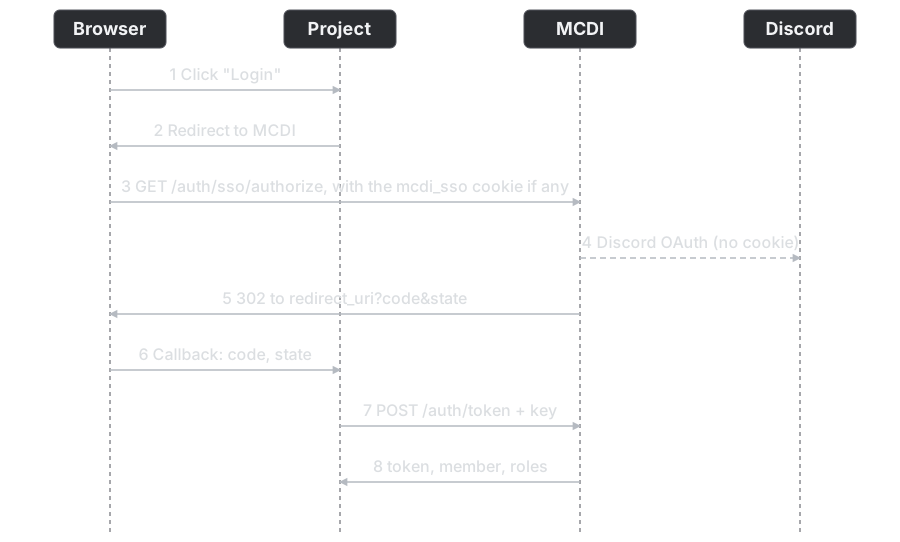
- The member clicks your login button. Your page sends the browser to MCDI with four query parameters.
- MCDI checks the project, the redirect address and the server. If the browser has a valid
mcdi_ssocookie, MCDI skips Discord and goes straight to step 4. Otherwise it sends the member through Discord. - After Discord, MCDI finds or creates the member, checks that they belong to the server and hold a role your project accepts, and sets the
mcdi_ssocookie. - MCDI redirects the browser to your
redirect_uriwith a one-timecodeand yourstate. - Your backend exchanges the code for a session token with
POST /api/auth/token, using the project API key.
Which entry point to use
There are two, and everything after the redirect is identical.
| If you want | Use | Behaviour |
|---|---|---|
| The standard "Login with MicroClub" button | GET /api/auth/sso/authorize | Members who already signed in on any MCDI project skip the Discord screen. |
| To make the member prove who they are again, for a sensitive action | GET /api/auth/authorize | Always goes through Discord, even when the browser holds a valid mcdi_sso cookie. |
Both take the same query parameters:
| Parameter | Meaning |
|---|---|
client_id | Your project ID. |
redirect_uri | Where MCDI sends the browser back. It must match, character for character, one of the addresses an admin registered for your project. |
server_id | The Discord server the member signs in to. Your project must have access to it. |
state | A value you generate. MCDI returns it unchanged so you can check it matches. |
All four are required. Leaving one out is a 400 that lists what is missing.
const params = new URLSearchParams({
  client_id: PROJECT_ID,
  redirect_uri: 'https://app.example.com/auth/callback',
  server_id: '900000000000000001',
  state: crypto.randomUUID(), // store it, compare it on the callback
});

window.location.href = `${MCDI_URL}/auth/sso/authorize?${params}`;
Set state from a random value, keep it in the member's session, and refuse the callback if it does not match. That is your protection against forged callbacks.
What MCDI answers
A valid request with a valid SSO cookie redirects straight to your address:
HTTP/1.1 302 Found
Location: http://localhost:4000/callback?code=7da79cc8903153d2...&state=abc123
With no valid cookie it starts the Discord login. It sets a short-lived mcdi_auth_req cookie and redirects to /api/auth/discord:
HTTP/1.1 302 Found
Location: /api/auth/discord
The callback code lives for 120 seconds by default and works once. When the address is registered but something else is wrong, MCDI redirects back to you with the reason, so your page can show it:
HTTP/1.1 302 Found
Location: http://localhost:4000/callback?error=access_denied&error_description=Project+does+not+have+access+to+this+server&state=s1
error | Meaning |
|---|---|
invalid_client | The client_id is unknown or the project is inactive. |
invalid_redirect_uri | The redirect_uri is not registered for the project. |
access_denied | The project has no access to that server. |
insufficient_roles | The project limits who may sign in, and the member holds none of the accepted roles. |
MCDI never redirects to an address it cannot trust. When client_id or redirect_uri is the problem there is nobody safe to send the member to, so it answers with a JSON 400 instead:
{
  "statusCode": 400,
  "error": "invalid_redirect_uri",
  "message": "Redirect URI not allowed for this project"
}
Exchange the code
Your backend, never the browser, trades the code for a session. The call carries your API key and must come from the project that owns the code.
curl -s -X POST "$MCDI_URL/auth/token" \
  -H "X-API-Key: $MCDI_API_KEY" \
  -H "Content-Type: application/json" \
  -d '{
    "clientId": "<project id>",
    "code": "<the code from the redirect>",
    "redirectUri": "http://localhost:4000/callback"
  }'
{
  "token": "cfcf51c8987f7028...",
  "refreshToken": "b86ac997ca73309d...",
  "expiresAt": "2026-11-04T18:16:43.479Z",
  "member": {
    "id": "800000000000000010",
    "username": "alice",
    "globalName": null,
    "displayName": null,
    "preferredName": null,
    "avatar": null,
    "email": null,
    "isClubMember": true,
    "isSystemAdmin": false,
    "joinedAt": "2026-10-05T18:16:30.320Z"
  },
  "roles": [
    {
      "roleId": "179122419032032858",
      "roleName": "TestRole_179122419032032858",
      "roleColor": 11184810,
      "rolePosition": 1
    }
  ]
}
The session lasts 30 days. The member object also carries internal columns such as passwordHash and the timestamps. Use id, username, globalName, displayName, avatar and isClubMember, and ignore the rest. Returning only the useful fields is tracked in issue #183.
| Status | When |
|---|---|
| 400 | The code was already used, expired, or does not match this client and redirect address. Codes work once, so retrying the same code fails. |
| 401 | The key is missing or invalid, or clientId is not the project that owns the key. |
| 429 | More than 30 exchanges in a minute. |
Check a session on each request
Ask MCDI whether a token is still good, and what the member's roles are right now:
curl -s -X POST "$MCDI_URL/auth/validate" \
  -H "X-API-Key: $MCDI_API_KEY" \
  -H "Content-Type: application/json" \
  -d '{ "token": "<session token>" }'
A 200 returns { "member": { ... }, "roles": [ ... ] }, with roles read live, so a Discord role a member lost counts from the next call. A 401 Invalid session means the token is expired, revoked, or was issued to a different project. Tokens never work across projects, even for the same member. The limit is 60 calls a minute, so cache a positive answer for a few seconds on your side instead of calling on every request.
Refresh before it expires
Trade the pair for a new one. This call is authenticated by the session token itself, as a Bearer token, not by your API key:
curl -s -X POST "$MCDI_URL/auth/token/refresh" \
  -H "Authorization: Bearer <session token>" \
  -H "Content-Type: application/json" \
  -d '{ "refreshToken": "<refresh token>" }'
{
  "accessToken": "025cd4b71820b191...",
  "expiresAt": "2026-11-04T18:16:43.649Z",
  "refreshToken": "5ce3a2c4e496dd2c..."
}
Note that the new session token is called accessToken here, while the exchange calls it token. The old pair stops working at once: validating the old token afterwards is a 401.
Log out
Three calls end sessions, from narrow to wide.
| Call | Who calls it | Effect |
|---|---|---|
POST /api/auth/logout with { "token": "..." } | Your backend, with the API key | Ends that one session of your project. Answers { "success": true }. |
POST /api/auth/logout-all with { "memberId": "..." } | Your backend, with the API key | Ends every session the member has on your project. |
POST /api/auth/sso/logout | The browser, with the cookie | Ends the member's global SSO session and every project session, then clears the cookie. Answers 204, even when the cookie is missing. |
Browser-only SSO endpoints
These read the mcdi_sso cookie, so the browser calls them with credentials: 'include'. They take no API key.
GET /api/auth/sso/sessionanswers who is signed in:{ "authenticated": true, "member": { ... }, "expiresAt": "..." }, or 401{ "authenticated": false }. Use it for a shared "Signed in as Alice" header.GET /api/auth/sso/sessionslists the project sessions under the cookie, without any token material, for a "Signed in to" screen:
{
  "sessions": [
    {
      "projectId": "06cc398f-0852-4bf7-944c-62a4c8a779ae",
      "projectName": "Docs demo project",
      "serverId": "900000000000000001",
      "createdAt": "2026-10-05T19:04:43.100Z",
      "expiresAt": "2026-11-04T19:04:43.104Z",
      "lastUsedAt": "2026-10-05T19:04:43.100Z"
    }
  ]
}
Every endpoint at a glance
| Endpoint | Authenticated by | Called by | Purpose |
|---|---|---|---|
GET /api/auth/sso/authorize | mcdi_sso cookie, optional | Browser | SSO-aware login, skips Discord when the cookie is valid. |
GET /api/auth/authorize | none | Browser | Login that always goes through Discord. |
GET /api/auth/discord/callback | none | Discord | Internal. Both entry points end here. |
POST /api/auth/token | API key | Your backend | Exchange the one-time code for a session. |
POST /api/auth/token/refresh | session token as Bearer | Your backend | Rotate the session and refresh tokens. |
POST /api/auth/validate | API key | Your backend | Check a token and get the member's current roles. |
POST /api/auth/logout | API key | Your backend | End one session of your project. |
POST /api/auth/logout-all | API key | Your backend | End all of a member's sessions on your project. |
GET /api/auth/sso/session | mcdi_sso cookie | Browser | Who is signed in. |
GET /api/auth/sso/sessions | mcdi_sso cookie | Browser | The project sessions under the cookie. |
POST /api/auth/sso/logout | mcdi_sso cookie | Browser | Log out of every project at once. |
Move an existing integration to SSO
You do not have to. GET /api/auth/authorize is unchanged and keeps working.
- Change the login button's address from
/api/auth/authorizeto/api/auth/sso/authorize. The callback, exchange, validate, refresh and logout calls stay exactly the same. - Optionally add a "Log out everywhere" button that calls
POST /api/auth/sso/logout. - Optionally show the signed-in member with
GET /api/auth/sso/session.
A login through /api/auth/authorize still sets the SSO cookie, so the member's next login through /api/auth/sso/authorize can skip Discord.
Rules to keep
- The API key is backend only. The browser only ever holds the session token or the cookie.
- Register every
redirect_uriyou use. A project may have several, and the match is exact. - Check
stateon every callback. - Tokens are stored as SHA-256 hashes, so a database leak does not give out usable tokens.
The full request and response fields are in the Authentication reference and the SSO reference.
Source: apps/api/src/modules/auth/auth.controller.ts, apps/api/src/modules/auth/auth.service.ts, apps/api/src/modules/auth/services/sso.service.ts, apps/api/src/modules/projects/projects.repository.ts, docs/auth-integration.md.