Architecture
How MCDI fits together: the repository, a request through the API, how callers authenticate, where data lives and how Discord stays in sync.
This page explains how MCDI is put together: what is in the repository, how a request travels through the API, who is allowed to call what, where data lives and how it stays in step with Discord. Read it before you change anything in apps/api.
The repository
MCDI is one repository managed with pnpm 10 workspaces and Turborepo, for Node 22 or newer.
| Workspace | Package | What it is |
|---|---|---|
apps/api | @mcdi/api | The NestJS 11 API. It uses Drizzle ORM with PostgreSQL, Redis, and a discord.js bot. It is built as CommonJS and shipped as a Docker image. |
apps/web | @mcdi/web | The Next.js 16 admin panel, and these docs. It is deployed on Vercel. |
packages/contracts | @mcdi/contracts | Types and constants shared by the API and the web app. See Shared contracts. |
packages/typescript-config | @mcdi/typescript-config | TypeScript presets the apps extend. |
packages/eslint-config | @mcdi/eslint-config | ESLint presets the apps extend. |
Every Turbo task depends on ^build, so @mcdi/contracts is always built before the apps that use it.
The system at a glance
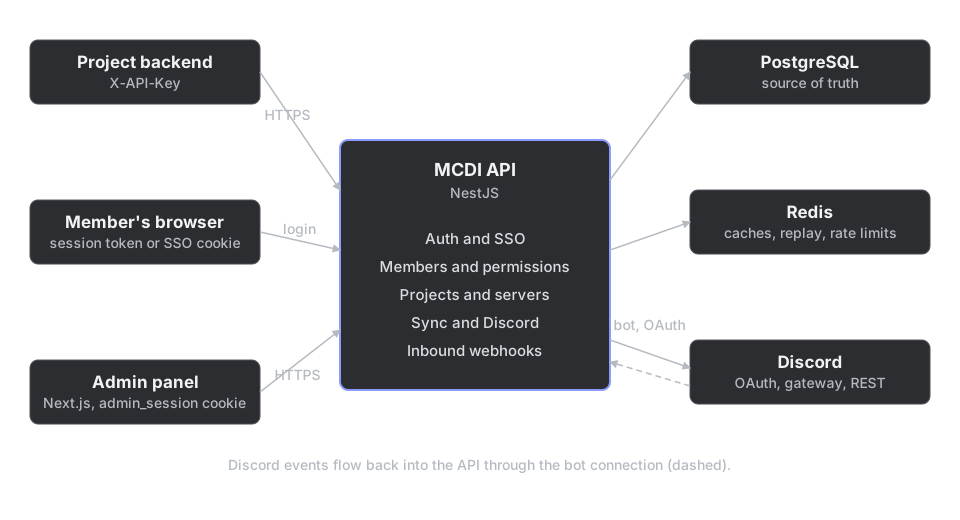
- Three kinds of caller use the API: project backends with an API key, members' browsers during login, and the admin panel with an admin session.
- PostgreSQL is the source of truth. The API reads Discord data from it, never from Discord, when it answers a request.
- Redis holds caches, plus the counters and one-time markers that inbound webhooks need.
- Discord is reached in two ways: OAuth for sign-in, and a bot that reads servers, members and roles and keeps PostgreSQL current.
A request through the API
Everything is served under the api prefix. The only routes outside it are the legacy admin pages GET /admin and GET /admin/login. The prefix is applied by applyApiPrefix in src/openapi/create-document.ts, which main.ts also uses.
A request goes through these steps, in this order:
-
Express setup in
main.ts. The cookie parser, CORS, and the JSON body parser. The body limit is 512 KB, because base64 avatars are large, and the raw body is kept (rawBody: true) because inbound webhook signatures are computed over the unparsed bytes. -
MethodNotAllowedMiddleware. Any method outside GET, POST, PUT, PATCH, DELETE, HEAD and OPTIONS gets a 405 with anAllowheader. -
AuditLoggingMiddleware. It runs on every route excepthealth,docsand the OpenAPI documents. It waits for the response to finish, then records usage for the endpoint, writes an audit row when the request was a successful mutation listed in its route map, and records a rejected API key or session when the answer was a 401 or 403. -
ServerActiveGuard, a global guard. When the request carries credentials and names a server (asserverIdorguildIdin the path,serverIdin the query or body, or anx-server-idheader), the server must exist and be active, or the answer is a 403Server is disabled. Routes under/serversare exempt, so admins can manage disabled servers. -
The route's guards.
ApiKeyGuard,SessionGuard,SystemAdminGuard, and on a few routesThrottlerGuard. The throttler is not global: only routes that declare it are limited. -
The global
ValidationPipe. It runs withwhitelistandforbidNonWhitelisted, so a body or query with a field the DTO does not declare is a 400. It also hastransformon, so values reach the handler as the DTO's types. -
Controller, service, repository. The handler calls a service, and the service calls a repository that talks to PostgreSQL.
-
Exception filters.
PostgresExceptionFilterturns some database errors into clean responses (invalid format codes into 400, constraint violations into 409) and makes sure everyHttpExceptionleaves with a JSON body.
test/helpers/create-app.ts builds the app for end-to-end tests and has to stay in step with main.ts, because the tests would otherwise run against a different pipeline from production.
Three ways to authenticate
| Caller | Credential | Guard | What it proves |
|---|---|---|---|
| A project backend | API key in X-API-Key (or as a Bearer token) | ApiKeyGuard | Which project is calling. Access is then scoped per project and server. |
| A member | Session token as a Bearer token | SessionGuard | Which member is calling. Any valid session works, including one issued to a project at login. |
| A system admin | The admin_session cookie, or a Bearer token | SessionGuard then SystemAdminGuard | A member, with a session from the admin login (not a project's), who holds an admin role. |
Projects. ApiKeyGuard finds the project by the key's prefix, compares a SHA-256 hash of the secret in constant time, and caches the result. When the request names a server, it then checks that the project may perform the operation the route declares with @RequireProjectOperation (READ by default) and holds the scope declared with @RequireScope. Both are stored per project and server pair.
Members. A member signs in with Discord and receives a session token, either through the admin login or through a project's login flow. SessionGuard accepts any valid, unexpired session. It is used for routes that act on the member's own data, such as their sessions and the inbound webhook submissions they may read.
Admins. Admins sign in with Discord OAuth. SystemAdminGuard accepts only sessions issued by the admin login, never one a project holds, and then requires the member to belong to the main server and hold one of the configured admin roles there: MC_EXECUTIVE_ROLE_ID, and optionally MC_DEV_LEADS_ROLE_ID and MC_IT_LEADS_ROLE_ID. The admin panel sends the session as the admin_session httpOnly cookie, and curl or Swagger can send it as Authorization: Bearer.
For the full login flow a project integrates with, see Login with MicroClub.
Data
PostgreSQL
PostgreSQL holds everything durable: servers, members, roles, permissions, projects, sessions, audit rows, sync logs and inbound webhook submissions. The schema is described by Drizzle entities in src/database/entities, and the migrations are in src/database/migrations. See API guide.
Redis
Redis is a cache and a coordination store. The caches below only copy what PostgreSQL holds, so losing them costs speed, not data.
| What | Used for | How long | What clears it |
|---|---|---|---|
| Project auth | The project found for an API key | 30 seconds | Updating, revoking, restoring or deleting the project, regenerating its key. |
| Project access | A project's operations and scopes on a server | 30 seconds | Granting or revoking access, enabling or disabling a server. |
| Permissions | A member's resolved permissions on a server | 5 minutes | The sync, when a member's roles or a server's roles change, and when a permission is added to or removed from a role. |
| Inbound webhook readers | The reader roles of a webhook | 5 minutes | Replacing the webhook's roles. |
| Inbound webhook protection | Used signatures (replay protection) and per-minute counters (rate limit) | Minutes | They expire by themselves. |
| Stats | Dashboard statistics | 5 minutes | Expiry. |
The lifetimes are environment variables, listed in Local setup.
Discord, the bot and the sync
The bot is a discord.js client created in DiscordModule. Its intents are guilds, guild members, presences, invites, voice states, webhooks, messages and message content. The privileged ones (members, presences and message content) must be enabled for the application in the Discord developer portal.
If the bot token is missing or wrong, the API still starts and serves everything that does not need Discord. It logs a warning and retries the login every 30 seconds.
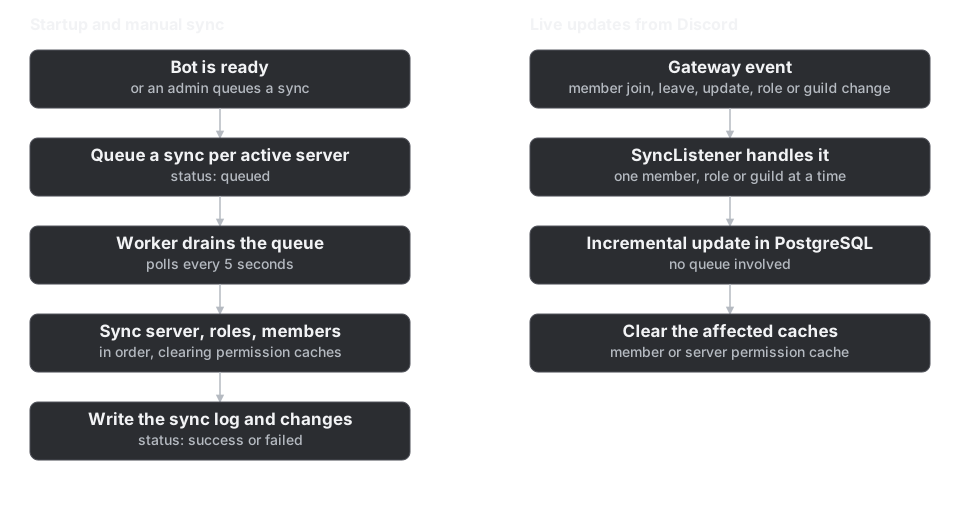
- Full syncs are queued as rows in the sync log with the status
queued. A worker polls for them every 5 seconds and runs them one at a time once the bot is ready. A sync reads the server's details, then its roles, then its members, writes a log with every change, and ends assuccessorfailed. When the bot becomes ready, one sync is queued for each active server. Admins queue more from the admin panel. - Live updates come from the gateway.
SyncListenerhandles member joins, leaves and updates, user updates, and role and guild changes as they happen. It updates only what changed and clears the related permission caches.
Where inbound webhooks fit
InboundWebhooksModule has three controllers, which is why it looks different from the others:
- an admin controller (
/admin/inbound-webhooks), behindSystemAdminGuard, to create and manage webhooks; - an ingest controller, behind
ApiKeyGuard, where projects send submissions; - a read controller, behind
SessionGuardand a guard that checks the member's Discord roles, where members read what was received.
It imports ProjectsModule only to get the dependencies of ApiKeyGuard. Keep that dependency one-way, so nothing in ProjectsModule imports inbound webhooks. Signing secrets are encrypted at rest with INBOUND_WEBHOOK_ENCRYPTION_KEY, and there is no key rotation: changing the key means re-creating the stored secrets.
The behaviour a project sees is described in Inbound webhooks: overview.
Source: apps/api/src/main.ts, apps/api/src/app.module.ts, apps/api/src/openapi/create-document.ts, apps/api/src/common/guards, apps/api/src/common/filters/drizzle.filter.ts, apps/api/src/modules/audit/middleware/audit-logging.middleware.ts, apps/api/src/modules/servers/server.guard.ts, apps/api/src/modules/discord/discord.module.ts, apps/api/src/modules/sync, apps/api/src/modules/inbound-webhooks/inbound-webhooks.module.ts, turbo.json.